

StyleBuddy App: The Complete Guide to India's AI Fashion Styling App

- Product Updates
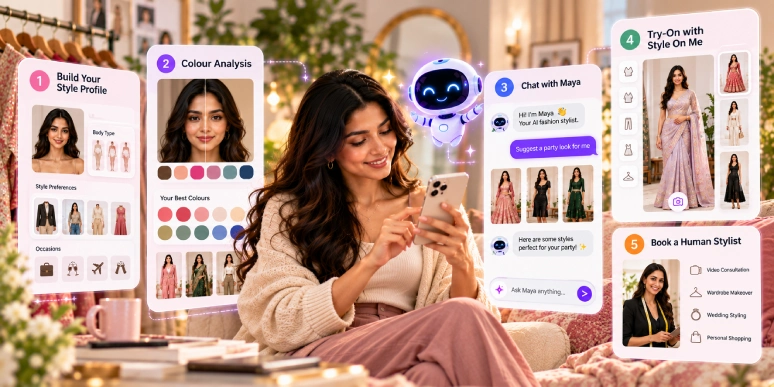
The StyleBuddy app is a free AI fashion styling app for Android and iPhone, built in India. It analyses your skin tone and body type, lets you try editorial looks on your own photo with Style On Me, answers styling questions through Maya, its AI stylist, and books human stylists.
What is the StyleBuddy app?
The StyleBuddy app is an AI personal styling app that helps you decide what suits you, what to wear and what to buy. It is made by StyleBuddy, an Indian AI styling and fashion discovery platform, and is free to download on Google Play and the App Store.
The app brings together four things that usually live in separate apps: editorial fashion inspiration, AI try-on on your own photo, AI colour and body analysis, and access to human stylists.
How the app is laid out
The StyleBuddy app has four tabs along the bottom of the screen:
- Home: the editorial feed, with Latest Looks, Trending Looks collections and your Generated Looks.
- Shop: the "For You" page, with product search, Curated Styles and categories such as Casual Wear.
- Explore: your skin-tone colours, best colour combinations, Talk to Stylist (Maya), Shop Looks, and Styling & Shopping Services.
- Profile: your style preferences, body type and skin tone, and the photo used for try-on.
Your StyleCoins balance sits in the top corner of the Home screen.
How to get started with the StyleBuddy app
Setting up the StyleBuddy app takes five steps, and the more you fill in, the more personal your looks and advice become.
- Download the app and create your account. StyleBuddy is free on Android and iPhone.
- Set your style preferences. In Profile, open Preferences and choose your gender, the occasions you dress for (Casual Wear, Formal Wear, Sports Wear, Wedding Wear, Office Wear), your favourite outfits (such as shirts, kurtas, hoodies and jackets), favourite accessories (such as shoes, watches, caps and rings) and favourite colours. Tap Save Details.
- Upload your photo. In the Edit Image tab, tap Upload New Image and add a clear, well-lit photo of yourself. The app uses it for Style On Me and your skin-tone and body analysis.
- Check your body type and skin tone. The Body Type & Skin Tone tab shows your analysed body type and skin tone, each with a short explanation.
- Try your first look. Go to Home, open any look and tap Style On Me.
[IMAGE 2: MID-ARTICLE] File: stylebuddy-app-style-profile-preferences.webp · under 150 KB · lazy load · Alt: StyleBuddy app style profile with occasions, favourite outfits, accessories and colours (demo account)
StyleBuddy app features, explained
Editorial looks: Latest Looks and Trending Looks
The StyleBuddy Home feed works like a fashion magazine that refreshes itself. Latest Looks shows the newest set of looks, with a countdown timer to the next drop and a Generate New Looks button when you want more.
Below it, Trending Looks groups looks into themed collections, each with a View All option. Collections seen in the app include:
- Garba Glam: festive Navratri looks, such as draped kurtas with dhoti pants.
- Ceremonial Luxe: embroidered sherwanis and safas for weddings.
- Retro Rewind: vintage-inspired tailoring and colour.
- Paris 2026: Runway Renaissance: runway-style leather jackets and sharp suits.
Each look opens full screen, where you can like it, download it or tap Style On Me.
Style On Me: try a look on your own photo
Style On Me is StyleBuddy's AI try-on. Open any look or product, tap Style On Me, and the app shows "Generating your look" while it creates an image of you in that outfit from your profile photo. You can download the result, and every look you create is saved in the Generated Looks tab on Home.
Style On Me appears on editorial looks in the Home feed and on products in the Shop tab, so you can try a wedding sherwani or an everyday kurta the same way.
Colours for your skin tone
StyleBuddy's skin-tone analysis tells you which colours suit you. In Explore, tap Colors for your skin tone to see your analysed skin tone, a short summary in plain language, and a palette of "Colors that match your skin tone" for tops, bottoms, dresses and footwear. A separate Best Color Combos for you view suggests colour pairings.
Body type analysis
The Body Type & Skin Tone tab in your profile names your body type, such as Inverted Triangle, and explains it. For example, the app describes an inverted triangle as shoulders noticeably broader than hips with a less defined waist. Knowing this helps you understand which cuts balance your proportions.
Maya: the AI stylist you can chat with
Maya is StyleBuddy's AI stylist, listed in Explore as Talk to Stylist, a "24x7 stylist for you to ask any styling questions". Select your occasion, type a question such as what to wear to a sangeet, and Maya replies with styling tips. You can also choose your preferred language for the chat. The app notes that the AI is still learning and may occasionally give inaccurate answers.
Shop: For You, Curated Styles and Shop Looks
The Shop tab, titled For You, lets you search products, browse Curated Styles and explore categories such as Casual Wear. Products open full screen with Style On Me, so you can see a piece on yourself before deciding.
Shop Looks, in Explore, shows complete outfits put together by StyleBuddy stylists, with each look's pieces, a short description, the occasion and the gender. One example is a streetwear look of straight-fit trousers, sneakers, a watch and a bag, described as a GenZ-inspired look for an off-duty day.
Book a human stylist
When you want a person rather than AI, Styling & Shopping Services in Explore opens StyleBuddy's human styling services. Options include:
- Personal Fashion Stylist Consultation: an online session with a stylist, ₹5,000 for 2 hours.
- Personal Shopper Service at Stores: an expert stylist shops with you in store, ₹10,000 for 4 hours.
Services are grouped into Everyday Styling & Shopping and Special Occasions. Full details are on StyleBuddy's styling services page.
StyleCoins
StyleCoins are StyleBuddy's in-app coins, shown in the top corner of the Home screen. You can earn free StyleCoins by completing challenges in the app, or buy them. On 9 October 2026 the app offered coin packs including 100 coins for ₹350 a month and 200 coins for ₹820 a month.
Who is the StyleBuddy app for?
The StyleBuddy app is for anyone who wants clearer answers about their personal style without paying for a stylist every time. It works especially well if you:
- dress for Indian occasions such as weddings, Navratri and festivals, as well as office and everyday wear;
- want to know which colours suit your skin tone before you shop;
- like to see an outfit on yourself before buying or wearing it;
- want fresh inspiration, from Indian festive wear to global runway looks;
- may want a human stylist for bigger moments, such as a wedding or a wardrobe refresh.
The app works for both men and women. Your preferences, occasions and gender shape the looks and advice you see.
What happens to your photos?
Photos are used only for features you choose, such as Style On Me. StyleBuddy says your photo is sent securely to Google's Gemini API to generate the result, StyleBuddy does not store the photos you upload, and neither StyleBuddy nor Google uses them to train AI models. Generated looks stay in your account until you delete it. For access or deletion requests, email help@stylebuddy.in.
Frequently asked questions
What is the StyleBuddy app?
The StyleBuddy app is a free AI fashion styling app for Android and iPhone. It analyses your skin tone and body type, shows editorial looks you can try on your own photo with Style On Me, lets you chat with Maya, its AI stylist, and connects you to human stylists and shoppable looks.
Is the StyleBuddy app free?
Yes, the StyleBuddy app is free to download. Some features use StyleCoins, which you can earn by completing challenges or buy in coin packs. Human stylist services are paid separately, such as a two-hour online consultation for ₹5,000.
How does Style On Me work?
Style On Me is StyleBuddy's AI try-on. Open a look or product, tap Style On Me, and the app generates an image of you wearing it from your profile photo. You can download the result, and it is saved in Generated Looks on the Home screen.
How does the StyleBuddy app find colours for my skin tone?
The StyleBuddy app analyses your skin tone from your photo, names it, and explains it in a short summary. It then shows a palette of colours that match your skin tone for clothing and footwear, plus a separate set of best colour combinations for you.
Who is Maya in the StyleBuddy app?
Maya is StyleBuddy's AI stylist, available around the clock under Talk to Stylist. You choose your occasion, ask any styling question and get instant tips, and you can pick your preferred chat language. StyleBuddy notes that Maya is still learning and may occasionally be inaccurate.
Can I book a real stylist through the StyleBuddy app?
Yes, StyleBuddy's Styling & Shopping Services section lets you book human stylists. Options include a Personal Fashion Stylist Consultation online, ₹5,000 for 2 hours, and a Personal Shopper Service at stores, ₹10,000 for 4 hours, across everyday and special-occasion styling.
What are StyleCoins?
StyleCoins are StyleBuddy's in-app coins, shown on the Home screen. You can earn free StyleCoins by completing challenges or buy coin packs, such as 100 coins for ₹350 a month. Available packs and prices can change, so check the app for current options.
Is the StyleBuddy app for men or women?
The StyleBuddy app is for both men and women. You set your gender in your style profile, along with occasions, favourite outfits, accessories and colours, and the app tailors looks to you. Its collections range from menswear sherwanis and suits to festive and everyday styles.
Download the StyleBuddy app
The StyleBuddy app is free. Set up your style profile in a few minutes, find your colours and try your first look with Style On Me.
- Android: StyleBuddy on Google Play
- iPhone: StyleBuddy on the App Store
Wondering how StyleBuddy compares with other apps? Read Top AI Fashion Styling Apps for Personal Styling. On the web, you can chat with Maya, browse curated style looks or explore personal styling services and colour analysis. More details are on the StyleBuddy mobile app page.